Snapchat Best Friends List Planets: Meanings & How It Works
Wondering what the Best Friends List Planets mean on Snapchat or where you rank in someone’s Friend Solar System? This guide explains all eight planets in order, what each ranking means, and how to check your position on a friend’s Best Friends list.
Snapchat’s Friend Solar System is a Snapchat+ feature that uses planets from Mercury (#1) to Neptune (#8) to show your position among a friend’s top eight. These best friends planets reflect how often you interact on Snapchat, not how close you are in real life. You’ll also learn how Snapchat friendship levels work, why planet rankings change, and how the Best Friends List differs from friend emojis.
What Is the Snapchat Best Friends List?
The Snapchat Best Friends List shows up to eight people you Snap and Chat with most frequently. Snapchat automatically selects these friends based on your recent interactions, so you cannot manually arrange the list. Your Best Friends also appear prominently when sending Snaps or starting conversations.
The list updates regularly as your communication habits change. If you start interacting more with someone, they may move into your top eight, while less active friends may drop off. Snapchat+ subscribers can also view an Extended Best Friends List showing eight current and eight upcoming Best Friends.
Also Read: How to Unpin Someone on Snapchat – ( Step-by-Step Guide 2026 )
How to See Your Best Friends List Planets on Snapchat
You can find your Best Friends through Snapchat’s Chat and Send To screens. These sections help you quickly contact people you communicate with most often.
On the Chat screen:
- Open Snapchat and swipe right from the Camera screen.
- Look for your frequently contacted friends.
- Check for Friend Emojis beside their names.
On the Send To screen:
- Open Snapchat and take a photo or video Snap.
- Tap Send To.
- Look for your Best Friends among the suggested recipients.
How to View the Extended Best Friends List With Snapchat+
The Extended Best Friends List is a Snapchat+ feature that shows your eight current Best Friends and eight upcoming Best Friends. It also lets you see whether their positions have changed since your last check.
To access it:
- Open Snapchat and tap your profile icon.
- Tap your Snapchat+ membership card.
- Find and enable Extended Best Friends List.
- Open My Friends under My Account to view the list.
What Are Snapchat Best Friends Planets?
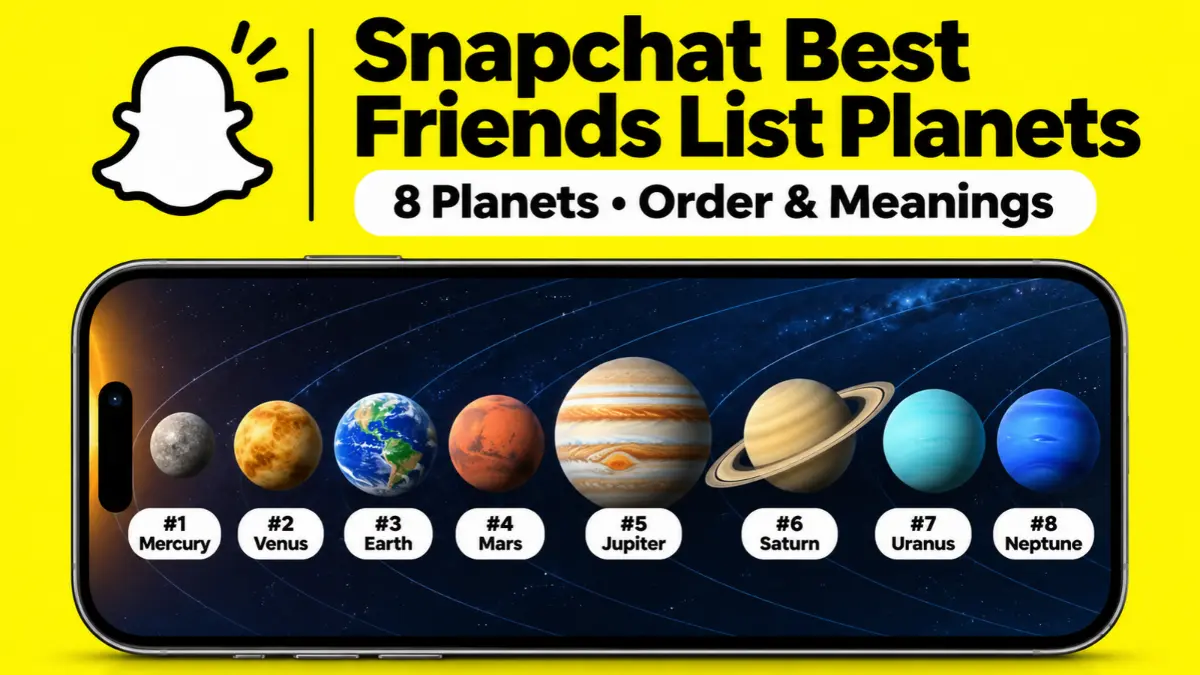
Snapchat Best Friends Planets are part of the Friend Solar System, a Snapchat+ feature that represents friendship rankings using eight planets. Each planet shows your position in someone’s Best Friends List, from Mercury (#1) to Neptune (#8).
In this system, the friend whose Solar System you are viewing represents the Sun, while your Bitmoji appears as a planet. The closer your planet is to the Sun, the higher your position in their ranking. You need Snapchat+ to access this feature.
Also Read: What Does the Green Dot Mean on Snapchat? Activity Indicator Explained
Snapchat Best Friends List vs. Planets: What’s the Difference?
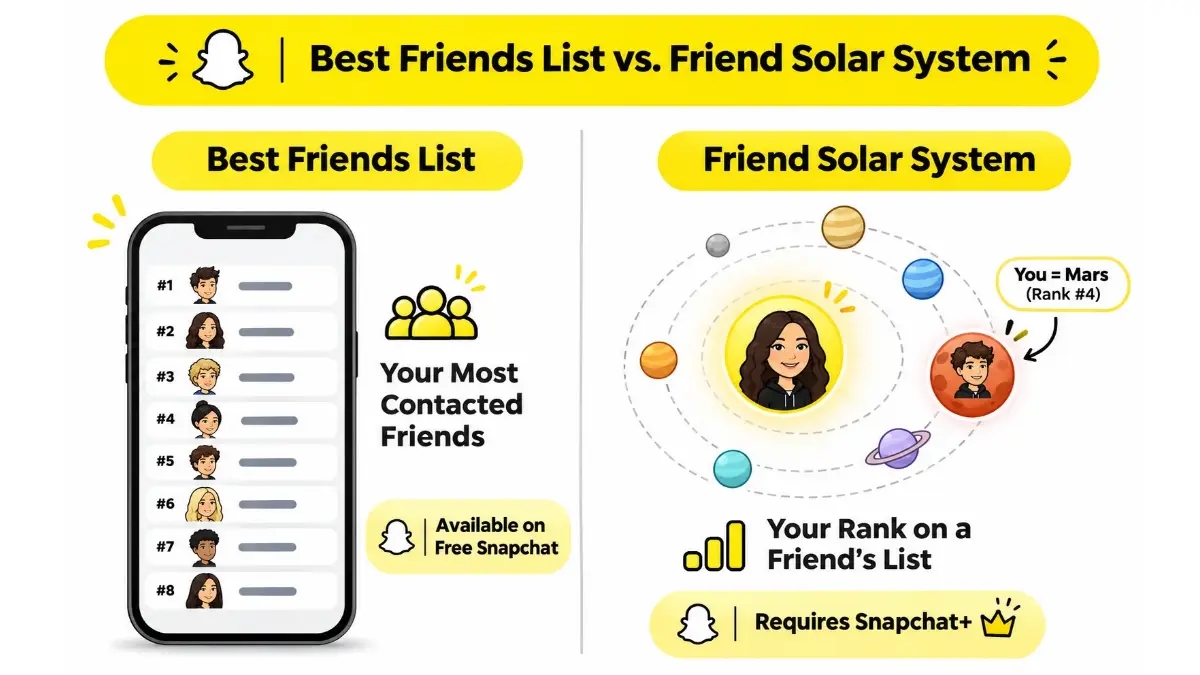
The Snapchat Best Friends List shows the people you Snap and Chat with most, while the Friend Solar System shows your position in another person’s ranking. Both features reflect Snapchat interactions, but they display the information differently.
The regular Best Friends List is available to everyone, while planets require a Snapchat+ subscription. Your full Best Friends List remains private, and the Solar System reveals only the viewer’s individual planet position.
Snapchat Planets in Order: All 8 Rankings and Meanings
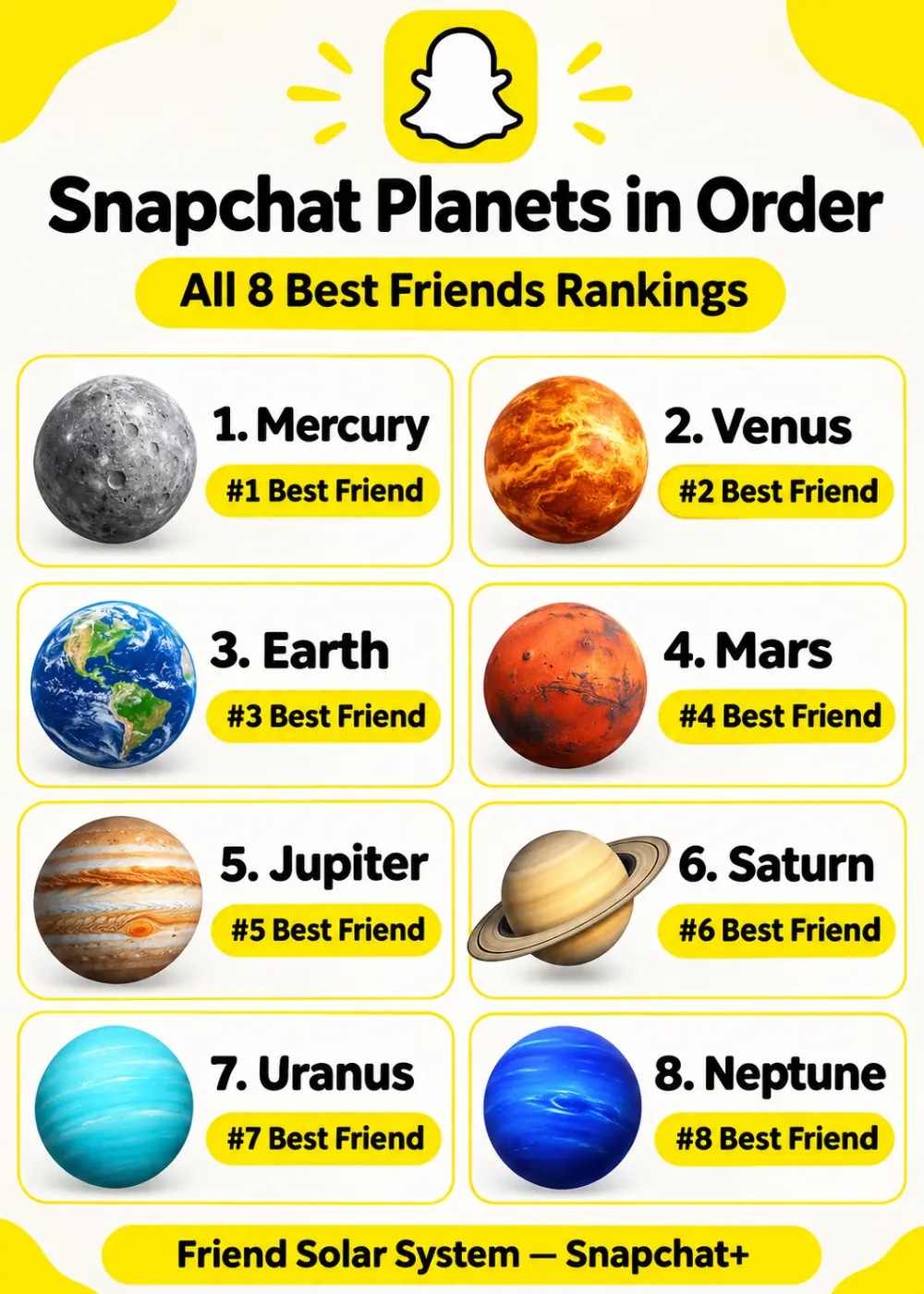
The Snapchat Planets in Order follow the same sequence as the eight planets in our solar system. Each planet represents a position in someone’s Best Friends ranking, starting with Mercury at #1 and ending with Neptune at #8.
1. Mercury – Your #1 Best Friend
Mercury represents the first position in someone’s Snapchat Best Friends List. If you appear as Mercury, you are their highest-ranked Best Friend in the Friend Solar System.
2. Venus – Your #2 Best Friend
Venus represents the second position in Snapchat’s planet ranking. It means you are their #2 Best Friend, just below Mercury.
3. Earth – Your #3 Best Friend
Earth represents the third position in someone’s Friend Solar System. You hold the #3 spots among their eight ranked Best Friends.
4. Mars – Your #4 Best Friend
Mars represents the fourth position in Snapchat’s Best Friends ranking. You remain among their top eight, with three friends ranked above you.
5. Jupiter – Your #5 Best Friend
Jupiter represents the fifth position in the Snapchat Friend Solar System. It means you occupy the fifth spot among that person’s Best Friends.
6. Saturn – Your #6 Best Friend
Saturn represents the sixth position in someone’s Best Friends List. You are still among their eight Best Friends, although five positions rank above yours.
7. Uranus – Your #7 Best Friend
Uranus represents the seventh position in Snapchat’s planet ranking. It places you second-to-last among the eight positions in their Solar System.
8. Neptune – Your #8 Best Friend
Neptune represents the eighth and final position in the Friend Solar System. Being Neptune does not mean someone dislikes you; it simply shows your position in their Snapchat ranking.
Also Read: Snapchat Features Explained: Step-by-Step Guide to Snap Planets & More
How to See Your Planet on Someone Snapchat Best Friends List
You can check your planet through a friend’s Friendship Profile if you have an active Snapchat+ subscription. When the Friend Solar System is enabled and the relevant badge is available, Snapchat displays your position as a planet.
Follow these steps:
- Open Snapchat and go to the Chat screen.
- Tap your friend’s Bitmoji to open their Friendship Profile.
- Look for the gold-ringed Best Friends badge.
- Tap the badge to reveal your planet.
- Match the planet with its ranking in the list above.
Your planet shows your position in that friend’s Solar System. It does not reveal the identities of everyone else on their Best Friends List.
How to Turn Snapchat Friend Solar System On or Off
Snapchat keeps Friend Solar System turned off by default for first-time Snapchat+ subscribers. You can enable or disable it anytime through your subscription settings.
- Open Snapchat and tap your profile icon.
- Tap your Snapchat+ membership card.
- Open the Snapchat+ feature management page.
- Find the Solar System and turn it on or off.
How Does Snapchat Calculate Best Friends and Planet Rankings?
Snapchat ranks Best Friends based on how frequently and recently you exchange Snaps and Chats. The people you communicate with most are more likely to appear among your top eight. As these interactions change, your Best Friends and planet rankings can change too.
However, Snapchat does not publicly reveal its complete ranking algorithm. There is no verified number of Snaps or Chats that guarantees Mercury or any other position.
Do Snapstreaks Affect Your Best Friends Ranking?
A Snapstreak tracks how many consecutive days you and a friend have exchanged Snaps. While a streak can reflect regular communication, having a long streak does not guarantee the #1 Best Friend position.
For example, you might have a 200-day streak with someone but still appear as Jupiter in their Solar System. Snapstreaks and Best Friends rankings are separate features.
Also Read: What Does Time Sensitive mean on Snapchat – Complete Guide
Are Snapchat Best Friends and Planet Rankings Mutual?
Snapchat Best Friends rankings are not always mutual. You might appear as Mercury in someone’s Solar System while they appear as Mars in yours.
Each person’s ranking reflects their own Snapchat interactions. This means two friends can have different planet positions for each other.
Snapchat Best Friends Badge vs. Friends Badge
Snapchat’s official Friend Solar System guide describes a gold-ringed Best Friends badge on Friendship Profiles. Tapping this badge lets eligible Snapchat+ subscribers check their planet position.
Some third-party guides also describe a separate Friends badge for one-sided Best Friends connections. However, Snapchat’s official Solar System documentation does not clearly confirm that distinction, so you should not rely on the badge label alone to determine whether a ranking is mutual.
Why Does Your Snapchat Planet Change?
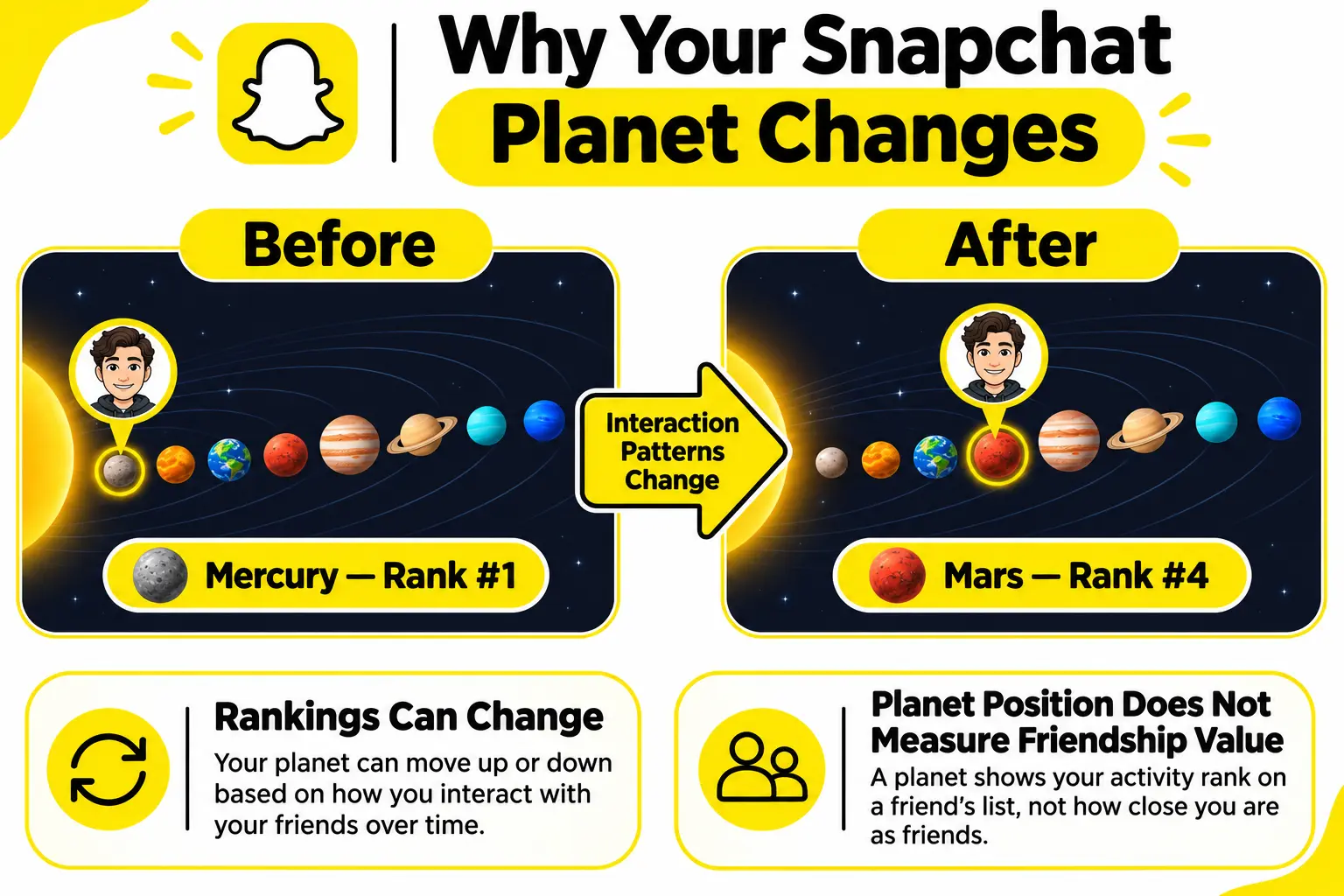
Your Snapchat planet can change when your interactions with a friend change or when that person communicates more frequently with others. For example, you might move from Mercury to Mars if other friends move higher in their Best Friends ranking.
Common reasons include:
- You exchange fewer Snaps or Chats.
- Your friend communicates more with other people.
- New friends enter their top eight.
- Your relative position changes over time.
Snapchat updates Best Friends rankings automatically, but it does not publish an exact update schedule.
Why Did Your Snapchat Planet Disappear?
Your Snapchat planet may disappear if the Friend Solar System is disabled, your Snapchat+ subscription expires, or the relevant badge is no longer available. A change in your ranking may also affect whether you can view a planet.
Try these fixes:
- Check that your Snapchat+ subscription is active.
- Make sure the Friend Solar System is enabled.
- Open the correct Friendship Profile.
- Update Snapchat and reopen the app.
A missing planet does not automatically mean someone blocked or removed you.
Why Your BFF Disappeared From the List
A friend may disappear from your Snapchat Best Friends List when you communicate less frequently or other friends become more active contacts. Since Snapchat updates rankings automatically, your Best Friends can change without you manually removing anyone.
Your BFF ❤️ or Super BFF 💕 emoji can also disappear if you no longer meet the requirements for being mutual #1 Best Friends. Snapchat Support cannot manually restore lost friendship emojis.
How to Stay on Someone’s Best Friends List
Staying on someone’s Snapchat Best Friends List depends on regular communication. Exchanging Snaps and Chats consistently may help maintain your position, although no method guarantees a particular ranking.
You can:
- Send Snaps regularly.
- Have natural, two-way conversations.
- Reply to their messages.
- Maintain Snapstreaks if you both enjoy them.
- Stay in touch consistently.
Your position also depends on how frequently that person communicates with other friends, so even regular interactions cannot guarantee Mercury.
How to Delete Someone From Your Best Friends List
You cannot manually delete someone from Snapchat’s automatic Best Friends ranking. However, reducing Snaps and Chats with that person may cause their position to drop as your list updates.
If you want to remove them from your Snapchat Friends List completely, follow these steps:
- Open Snapchat and go to the Chat screen.
- Press and hold the friend’s name.
- Tap Manage Friendship.
- Select Remove Friend.
You can also choose Block if you want to prevent direct contact. Clearing a conversation alone is not a verified way to remove someone from your Best Friends ranking.
Snapchat Best Friends List Privacy: Who Can See Your Rankings?
Your complete Snapchat Best Friends List is private. Other users may be able to tell whether they are among your Best Friends, but they cannot see your full ranked list.
With Snapchat+, someone may check their own planet position in your Friend Solar System. However, they cannot see the names or planet positions of everyone else on your list.
For example, a friend who appears as Venus can see that they hold the second position. They cannot use that information to discover who occupies Mercury or the other six positions.
Frequently Asked Questions
Can You Manually Change Your Snapchat Best Friends Ranking?
No. Snapchat automatically updates Best Friends based on your interactions. Snapchat+ does let you privately pin one #1 Best Friend, but this is a separate feature from automatic planet rankings.
Can You Have More Than Eight Best Friends With Snapchat+?
Snapchat+ lets you view eight current and eight upcoming Best Friends through its Extended Best Friends List. However, the Friend Solar System still contains only eight planetary positions.
Are Snapchat Planets the Same as Snap Score?
No. Snapchat Planets show your position in someone’s Best Friends ranking, while Snap Score reflects activity on your Snapchat account. Having a high Snap Score does not guarantee Mercury or any other planet.
Conclusion
Snapchat Best Friends List Planets show where you rank among someone’s top eight friends, from Mercury at #1 to Neptune at #8. The Friend Solar System makes these rankings easier to understand, while Snapchat+ offers additional features for viewing your Best Friends. Remember that planet positions reflect interactions on Snapchat, not the value of your real-life friendships.