

What Does the Green Dot Mean on Snapchat? Activity Indicator Explained
What does the green dot mean on Snapchat? It’s an Activity Indicator that shows someone has used the app recently. You may see it beside a friend’s Bitmoji or profile picture, but it doesn’t mean they’re online right now. They may have already closed Snapchat, so the dot doesn’t prove they’re chatting, reading your messages, or ignoring you. You can also turn off your own green dot through Snapchat’s privacy settings.
This guide explains where the green dot appears, how long it may stay visible, and how accurately it reflects someone’s activity. You’ll also learn why the dot sometimes disappears, how to hide your activity status, and how to tell Snapchat’s green dot apart from other green indicators on your phone.
Where Does the Green Dot Appear on Snapchat?
The green dot appears beside a friend’s Bitmoji or profile avatar on Snapchat. It shows that the person has used the app recently and has not turned off their Activity Indicator. You may notice the dot when viewing someone’s avatar, although its placement can vary across Snapchat screens and app versions.
However, not every friend’s profile will show a green dot. The person may have disabled the feature or may not have been active recently. Also, don’t confuse the green dot beside a Bitmoji with the one at the top of your phone’s screen, which is a separate privacy indicator.
Does the Green Dot Mean Someone Is Online Right Now?
No, the green dot does not always mean someone is online right now. It only shows that they have used Snapchat recently. They might still be using the app, or they may have already closed it.
For example, your friend could open Snapchat, check a few Snaps, and leave. You might still see their green dot afterward. It doesn’t prove they are reading your messages, chatting with someone else, or ignoring you.
How Does Snapchat’s Activity Indicator Work?
Snapchat’s Activity Indicator shows a small green dot beside a friend’s avatar when they have used the app recently. The feature works when the person has enabled activity visibility in their privacy settings. Other users may see this signal, but it doesn’t include an exact activity time.
The indicator also doesn’t reveal what someone was doing on Snapchat. They could have opened a Chat, sent a Snap, or watched a Story, but the dot doesn’t identify any of these actions. Snapchat hasn’t publicly explained exactly which actions trigger the indicator or how often it updates.

How Long Does the Green Dot Stay on Snapchat?
Snapchat has not officially confirmed how long the green dot stays visible after someone stops using the app. According to Snapchat Support, the dot only indicates recent activity. It doesn’t show the exact time a person was last online.
Some third-party websites suggest different time limits, ranging from minutes to several hours, but Snapchat hasn’t verified those estimates. The indicator may disappear when someone’s activity is no longer considered recent or when they turn off the feature. This means you cannot rely on the green dot to find out exactly when someone last opened Snapchat.
Read More: How to Unpin Someone on Snapchat – ( Step-by-Step Guide 2026 )
How Accurate Is Snapchat’s Green Dot?
The green dot can help you recognize recent Snapchat activity, but it is not a live online tracker. Snapchat doesn’t publish an accuracy rate or refresh schedule for the Activity Indicator. Because of this, you cannot tell exactly how quickly the dot updates when someone leaves the app.
For example, a friend might check their Snaps and close Snapchat while their green dot is still visible. On the other hand, someone may be using Snapchat without showing a green dot because they’ve disabled the feature. So, the indicator can give you a general idea of recent activity, but it cannot confirm someone’s current availability.
How to Turn Off the Green Dot on Snapchat
You can turn off the green dot by disabling the Activity Indicator in Snapchat’s privacy settings. This stops other Snapchat users from seeing that green recent-activity signal on your avatar.
Follow these steps:
- Open the Snapchat app on your iPhone or Android phone.
- Tap your Profile or Bitmoji icon to open your profile.
- Tap the Settings gear icon (⚙️).
- Scroll to App & Privacy and select My Privacy & Data.
- Under Privacy Choices, tap the Activity Indicator.
- Turn the Activity Indicator toggle off.
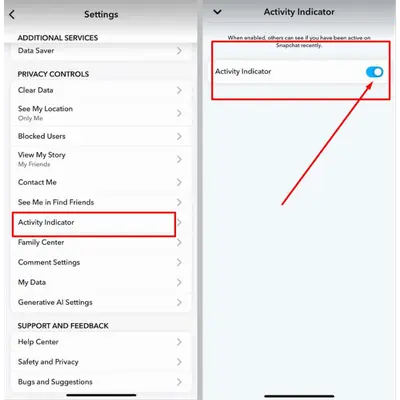
That’s it! Your recent activity will no longer be shown through the green dot. You can turn the feature back on whenever you want. If your settings look different, check Snapchat’s official Activity Indicator instructions for the current menu path.
What Happens When You Turn Off the Activity Indicator?
When you disable the Activity Indicator, other users can no longer see your recent activity through the green dot. You can still send Snaps, chat with friends, watch Stories, and use Snapchat normally.
However, turning off the green dot does not hide everything you do on Snapchat. Friends may still see separate information, such as when you open their messages or view their Stories. This setting also does not hide your Snap Map location. You need to manage your location privacy separately.
Also Read: Snapchat Features Explained: Step-by-Step Guide to Snap Planets & More
Why Can’t I See Someone’s Green Dot on Snapchat?
If someone’s green dot is missing, it does not automatically mean they are offline or have blocked you. Snapchat does not display the indicator for every account in every situation.
Here are some possible reasons:
- They turned off their Activity Indicator: Snapchat allows users to hide their recent activity through privacy settings.
- They haven’t been active recently: The indicator is tied to recent Snapchat use, so it may not be displayed after inactivity.
- You’re looking in a different part of Snapchat: The green dot does not appear beside every avatar or on every screen.
- Your app looks different: Snapchat updates may change where features appear or how the interface looks.
If you are checking your own Activity Indicator, open Snapchat Settings and make sure the feature is enabled. You can also check whether your app needs an update if the settings are missing.
Remember: A missing green dot alone cannot tell you whether someone is online, has stopped using Snapchat, or has blocked your account.
Green Dot on Snapchat vs. Other Similar Indicators
Not every green dot you see while using Snapchat means someone is active. Some indicators come from your phone, while others belong to different Snapchat features.
Here is how to tell them apart:
| Indicator or Feature | What It Means |
| Green dot beside a friend’s avatar | The person has been active on Snapchat recently. |
| Green dot at the top of an iPhone screen | An app is using the camera, possibly with the microphone. |
| Green indicator at the top of an Android screen | An app is using the camera or microphone. |
| Circle or preview around a Snapchat Story | Story content is available to view. |
| Ghost Mode on Snap Map | Controls whether other people can see your location on the Map. |

What Does the Green Dot at the Top of Your Phone Mean?
If you see a green dot near the top of your phone screen while using Snapchat, it is usually a device privacy indicator, not someone’s online status.
On iPhone:
- A green dot at the top of your screen means an app is using your camera, with or without the microphone.
- An orange dot means an app is using only your microphone.
- Open Control Center to check which app recently used your camera or microphone.
On Android 12 and Later:
- A green privacy indicator appears at the top of your screen when an app uses your camera or microphone.
- Swipe down from the top of your screen to open the notification panel.
- Tap the green indicator to see which app is using your camera or microphone.
Since Snapchat often opens directly to its camera, you may notice this indicator when launching the app. Turning off Snapchat’s Activity Indicator will not disable your phone’s camera or microphone privacy alerts.
Also Read: What Does Time Sensitive mean on Snapchat – Complete Guide
Is the Green Dot on Snapchat Stories the Same as the Activity Indicator?
No. Snapchat’s Activity Indicator and Story indicators serve different purposes. A green dot beside a friend’s avatar refers to recent Snapchat activity. A circle or Story preview around someone’s profile picture relates to Story content you can watch.
Seeing a Story indicator does not prove that the person is online right now. Likewise, the green Activity Indicator does not tell you whether someone has posted a new Story or watched yours.
Does Ghost Mode Hide Your Green Dot?
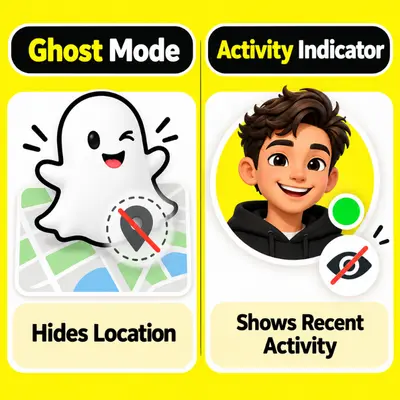
No, Ghost Mode does not hide your green Activity Indicator. These features control two different types of privacy on Snapchat. Ghost Mode hides your location from other people on Snap Map, while the Activity Indicator controls whether others can see that you’ve recently used the app.
If you want to hide both your location and recent activity, you need to change these settings separately. Open Snap Map → Settings → Ghost Mode to hide your location. Then go to Settings → My Privacy & Data → Activity Indicator and turn it off. Snapchat also offers Ghost Mode timer options, although their availability may vary.
FAQs about What Does the Green Dot Mean on Snapchat?
Does the Green Dot Mean Someone Is Chatting on Snapchat?
No. The green dot only shows recent activity. It doesn’t reveal whether someone is chatting, viewing Stories, or sending Snaps.
Does the Green Dot Affect Snapstreaks?
No. The green dot doesn’t affect Snapstreaks. Both friends must exchange photo or video Snaps daily to keep a streak going.
Is the Green Dot Available Without Snapchat+?
Yes. The Activity Indicator is a regular Snapchat feature. You don’t need a Snapchat+ subscription to use it.
Can You Hide Your Green Dot From Specific People?
Snapchat doesn’t offer a separate setting to hide your green dot from selected friends. You can turn off the Activity Indicator for everyone.
Does Blocking Someone Remove the Green Dot?
Blocking someone restricts their access to your profile and direct interactions. However, Snapchat doesn’t clearly document how blocking affects green-dot visibility in every situation.
Why Can I See Someone’s Green Dot but They Can’t See Mine?
Your Activity Indicator may be turned off while theirs is enabled. Each account has its own privacy settings, which can affect green-dot visibility.
Final Summary
What Does the Green Dot Mean on Snapchat? The green dot on Snapchat shows that someone has been active on the app recently, but it doesn’t always mean they’re online right now. It also doesn’t tell you whether they’re chatting, viewing Stories, or reading your messages.
Snapchat doesn’t officially confirm how long the green dot stays visible, so you shouldn’t use it to track someone’s exact activity. If the dot disappears, the person may be inactive or have turned off their Activity Indicator. You can also hide your own green dot through Snapchat’s privacy settings. This gives you more control over who can see your recent activity.